

Guides
SmoothSkin Home Hair Removal Sensor Not Responding: Solutions
Are you excited for your sessions with the SmoothSkin home hair removal device? But then the device runs into an issue: the sensor does not work or is not sensitive enough. Today, Vatico will help you understand why this happens and how to fix it.
Why the SmoothSkin hair removal sensor may not work
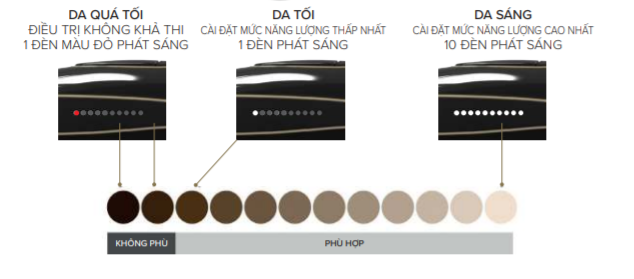
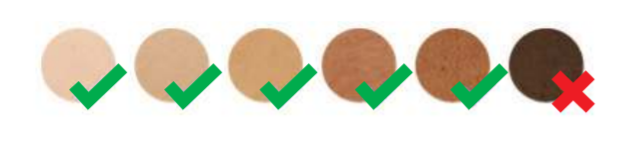
There are many reasons why you may not be able to use your SmoothSkin home hair removal device on your body. However, one of the most common reasons is that your skin tone is too dark for the device to operate. We provide a skin tone chart to help you check whether the device is suitable for use. If your skin is too dark, the device will not emit a flash.
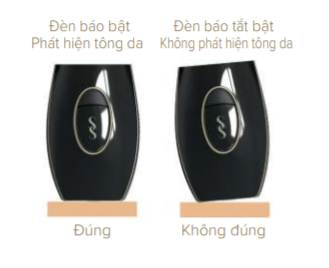
Another common reason is that the device is not placed flush against the area you want to treat. Or the treatment area is too small for the sensor to detect properly.
Lastly, which we certainly do not hope for, the device may be faulty.
How to fix it
You should check whether the skin tone chart matches your skin before using the device. Below is the skin tone chart provided by the manufacturer.
Second, try repositioning the device so that the entire treatment window is flush against the skin.
SmoothSkin Pure Fit – the optimal solution
We now have a new product line: SmoothSkin Pure Fit. This next-generation hair removal device features more sensitive sensing than ever, delivering a better hair removal experience. You no longer need to worry about an insensitive sensor or the device failing to detect a sufficient treatment area. The SmoothSkin Pure Fit home hair removal device will be a reliable partner in your hair removal journey.
See also
- Does hair grow back after hair removal? Which technology is right for me?
- Painless bikini hair removal at home with SmoothSkin
Vatico is an authorized distributor providing beauty products and devices for the Southeast Asian market.